Employee Preparedness Benefit

Give employees practical support for the personal crises that affect work, family, and peace of mind.

The Personal Continuity Planning™ (PCP) System helps employees organize critical information, prepare for disasters, and make legacy and end-of-life decisions through one self-paced, privacy-conscious program.

Employers provide access. Employees complete and control their own planning files in the PCV (Personal Continuity Vault).

No phone number required. See the system, sample resources, privacy model, and pilot options.

Are you a private individual looking for yourself or your family? For You & Your Family →

The business case for personal continuity3 minutes · for HR, benefits and leadership

Why employers offer it

“A prepared employee comes back to work more quickly.”

That’s the premise and value to employers who offer our crisis preparation resources to their employees. Whether it’s a one-off event that happens to one of your team members, like a home fire or hacker, or a community-wide disaster like a flash flood or “hurrinado”, you want your employees to be prepared for life’s crises.

When an accident, natural disaster, or hacking incident occurs, you want your people to be able to recover quickly, take care of their personal situations and families, and then be able to come back to work. Providing disaster preparation templates, checklists, workbooks and guidance will help each team member take responsibility to “be prepared”.

Get the Corporate Preview Packet →

Photo: Vitaly Gariev / Unsplash

Why organizations offer PCP

A practical benefit designed for employees — and manageable for HR

Practical employee support

Give employees a structured way to prepare before an emergency, major life event, or family transition.

Low administrative burden

One private join link for HR to share. Employees claim their own access, and self-paced participation means nothing for HR to run week to week.

Clear personal-data boundaries

BePrepared.biz does not collect or store the personal information employees enter into their planning files.

Fits your benefits strategy

Our resources are offered within your organization’s benefits strategy, usually as an add-on benefit like financial planning or wellness programs.

Sized to your firm

The corporate program is customized to your firm’s size, needs, and budget.

Your name on the access link

We can customize your access link with your organization’s logo and provide additional customization as needed. Ask us what is available.

What your people are up against

Unexpected threats land on employees every day.

Most of them happen away from work. All of them follow your people back to it.

Disasters

Earthquake, fire, flood, hurricane, tornado

Health crisis

Heart attack, stroke, seizure, memory loss

Accidents

Car crash, fall from ladder or roof, sports injury

Technology

Computer crash, loss of device, loss of photos

Attacks

Cyberattack, virus, blackout, theft

Gain peace of mind

Critical information and important documents organized and protected.

Protect the family

Prepare for potential disasters, develop strategies, and gather supplies.

Recover quickly

When crises do happen, get back to normal life — and back to work — as soon as possible.

One system. Three connected phases.

Employees can start with the need that matters most — and continue at their own pace.

  1. Phase 1Critical Information & Important Documents
  2. Phase 2Disaster Scenarios, Strategies & Supplies
  3. Phase 3Legacy & End-of-Life Planning

Critical Information & Important Documents

Help employees organize essential contacts, accounts, documents, and instructions their household may need during a crisis.

Disaster Scenarios, Strategies & Supplies

Practical guidance for the Big Five natural disasters — earthquake, flood, hurricane, tornado, wildfire — plus 72-hour supplies checklist.

Legacy & End-of-Life Planning

Guide the issues, decisions and instructions Self-Planners and Survivors/Helpers face before and after death.

What every employee gets

Editable workbooks

Simple to add to and update, and protected with encryption so only the employee can open them.

PIPP Tips

Helpful printable PDFs with advice on each part of the preparation process.

Self-paced videos

Short videos with extra tips and guidance along the way.

Live Fireside Chats

Access to live chats for employees’ own individual questions and issues.

How organizations use PCP

One pool, one private link, and employees take it from there

01

Choose your pool

Tell us how many people to cover. We size a license pool to your headcount and set it up as soon as payment is received.

02

Get your private join link

We give your HR team one private web address to drop into an email, a benefits portal, or an onboarding packet.

03

Employees claim their own access

Each person opens the link, enters a personal email address, and receives their own activation key by email. One person, one seat.

04

Employees prepare privately

They install the PCV desktop app, activate it once, and build their plan in an encrypted vault on their own computer.

Renewals and departures. Renew the pool and everyone’s access is extended at once. When someone leaves, we remove them from the pool: their seat frees up and their key stops working at its next check. Their files stay theirs, on their own computer.

Privacy statement: BePrepared.biz stores the account and access information needed to provide the service: your pool, and each person’s email address and activation. It does not collect or store the personal information employees enter into their planning files. Employers do NOT have access to employees’ completed files.

In under two minutes

What is Personal Continuity Planning™?

A short introduction to the three phases and how employees use them.

What is Personal Continuity Planning™?1 minute 41 seconds

See what employees receive

The Personal Continuity Vault (PCV)

Every employee gets the PCV: a desktop app where guided workbooks, checklists and trackers live in one encrypted vault on their own computer. Employers provide access. Employees keep their files, and only they can open them.

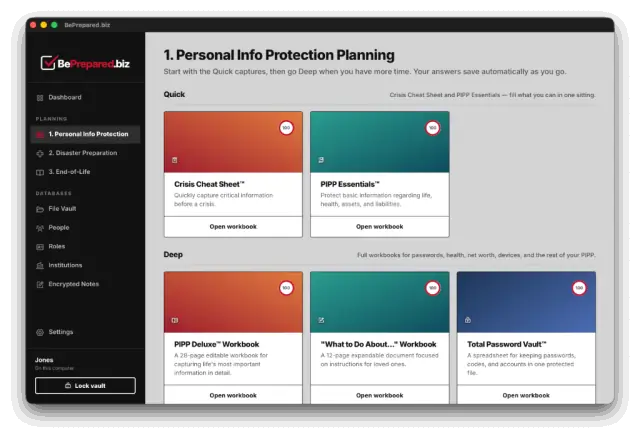
The PCV app, Phase 1 library: Crisis Cheat Sheet and PIPP Essentials as quick starts, with the PIPP Deluxe Workbook, What to Do About workbook and Total Password Vault for going deeper. The sidebar lists the three planning phases and the File Vault, People, Roles, Institutions and Encrypted Notes databases.
Guided planning, phase by phaseStart with a quick Crisis Cheat Sheet™ or go deep with the PIPP Deluxe™ Workbook. Answers save automatically as employees go.
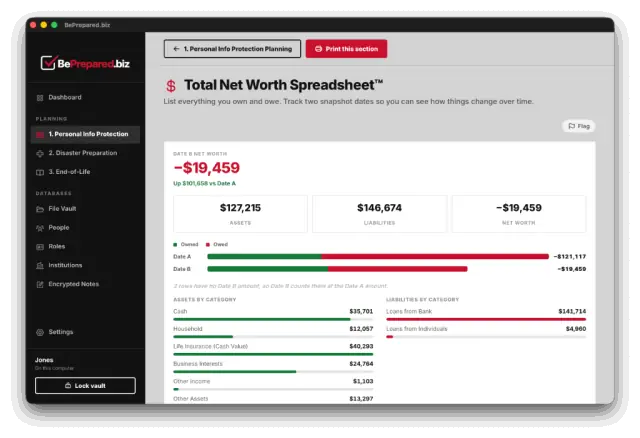
The PCV app showing the Total Net Worth Spreadsheet: total assets, total liabilities and net worth, with two snapshot dates for comparison and a Print this section button.
Real tools, not just checklistsBuilt-in trackers like the Total Net Worth Spreadsheet™ add it all up for the employee, and any section prints on demand.

An encrypted vault

One encrypted file on the employee’s own computer. Lock it with one click.

Three connected phases

Information, disasters, and end-of-life planning, each with quick starts and deeper workbooks.

Everything in one place

A file vault, people, roles, institutions and encrypted notes, ready when a household needs them.

Mac, Windows and Linux

A desktop app that employees install once and activate with their own key.

Screens show sample data.

See representative samples in the Corporate Preview Packet →

From people who have used the system

The value often becomes clearer once you start doing the work.

Rob Garibay

“I've completed the forms, which took many days because it prompted me to think about areas I'd forgotten. Now I know that if something happens to me, my wife will be able to find everything essential for a smooth transition.”

Read the full note

“I want to thank you for your Personal Information Protection Plan. Wow! What an effort that took to create this! You left nothing out. I've completed the forms, which took many days because it prompted me to think about and research areas that I'd forgotten where I archived them. Now I know that if something happens to me, my wife will be able to find everything that is essential for a smooth transition. And, if something should happen to both of us, our daughters, my brother, and our financial advisor will be able to locate same. I am grateful for your efforts in creating this marvelous tool!”

Rob Garibay

Karen Hill

“We all know we should prepare for personal crisis, but most of us don't know where to start. John Storm has done all the homework. There isn't a more comprehensive program to protect your family and assets.”

Read the full note

“As much as we all know that we should take steps to be prepared for personal crisis, most of us don't take the time. And where do we start? John Storm makes the process easier (note that I didn't say “easy”). He has done all of the homework and research for personal life planning and emergency preparedness so that we can save time and money and headaches! There is not a more comprehensive planning program to protect your family and your assets. Thank you, John!”

Karen Hill

Keith Topliffe

“The PIPP gave me an excellent framework to consolidate everything necessary for continuity of life for my surviving wife and daughter, a ready reference I still use today.”

Read the full note

Problem: “I am in the fourth quarter of life, with good health, but became concerned that everything I knew about our investments, finances, insurance, trust, will, tax returns, etc. and our property was not organized in one place so that my wife could find the information. If something (unexpected) were to happen to me, my wife would have had an incredibly stressful time untangling my filing system. I was also concerned that we did not have a record retention system in the event we were affected by natural disasters or fire, and we had no safe place in the house to store sensitive documents and passwords.

Solution: The Personal Information Protection Plan and the What To Do About Workbook gave me an excellent framework to consolidate in one place all key information that is necessary for continuity of life from my surviving wife and daughter. The questions which are posed in the PIPP triggered me to consolidate important documents, contact information, access codes, passwords, account numbers, etc. which are usually unavailable in one location and not easily found by someone who is not the originator. The PIPP has become a ready reference for me today. The What To Do About Workbook helped to bring together an action plan for the routines of life that need to continue in the event of a crisis. I also placed a copy of the PIPP in a safety deposit box and purchased a home safe because of this project.

I am grateful to the friend who developed these tools and gave me valuable coaching and feel that by applying them I have given my wife and family a gift that will ease their stress if faced with a family crisis. I would highly recommend these tools and to put the time into giving your family this gift.”
Keith Topliffe

From an estate planning attorney

“The PIPP workbooks are REMARKABLE tools, which I have used personally for important information gathering in preparation for drafting trusts and wills as an estate planning attorney. The advice and specific instructions clearly teach, remind, motivate, lead and guide anyone through the process. Effective and efficient progress is made faster and easier toward building an estate plan as well as an emergency preparedness plan. The PIPP brings to mind important items most people would not think of and thus overlook.

The PIPP information is very thorough, concise and complete so it will certainly help any family get prepared and have peace of mind. The heavy weight of a huge “ought-to” will be lifted off and you will be glad you completed your own PIPP.”

Bill Casey, J.D.

Evaluate PCP without scheduling a sales call

Get a concise Corporate Preview Packet for HR, benefits, wellness, and organizational leaders

Review the system, employee experience, privacy model, and rollout options on your own schedule.

  • Executive overview of the employee need and PCP approach
  • One-page map of the three-phase system
  • Representative sample pages from each phase
  • What employees see, complete, and control
  • Clear privacy and data-boundary explanation
  • Pilot and broader rollout options

Email me the Corporate Preview Packet

No phone number required.

By requesting the packet, you agree to receive the packet and occasional information from BePrepared.biz. You may unsubscribe at any time. Privacy Policy.

Prefer to talk it through?

Contact John Storm for more information.

John founded the program and answers employer questions himself.

Frequently asked questions

Frequently asked questions

Can our organization see what employees complete?

No. Employers do NOT have access to employees' completed files, and BePrepared.biz does not collect or store the personal information employees enter into their planning files. Those files stay in an encrypted vault on the employee's own computer.

How do employees get access?

Once your license pool is set up, we give your HR team one private join link. Share it however you reach your people. Each employee opens it, enters a personal email address, and receives their own activation key by email. They then install the PCV (Personal Continuity Vault) desktop app and activate it once.

What does this cost our organization?

Pricing is based on the number of people covered and is typically structured as an annual sponsorship, similar to an EAP or wellness benefit. Companies pay by check or invoice, and we set up your license pool when payment is received. Request the Corporate Preview Packet or contact John for current pricing and a sample rollout timeline.

How long does it take to roll out to our team?

Most organizations are rolling out within two to three weeks. After that, you are live as soon as you share the join link. Employees install the PCV (Personal Continuity Vault) desktop app for macOS, Windows or Linux; phones and tablets are not supported yet.

Is this only for individuals, or can employees use it for their families too?

The same three-phase PCP system works for households as well as organizations. Employees can use their access to build a plan for their entire family, not just themselves. Each key works on up to 5 of that person's computers.

What happens to an employee's access if they leave the company?

Completed files belong to the employee and are saved on their own computer, not on BePrepared.biz or company servers, so nothing is lost when employment ends. When someone leaves, we remove them from your pool: their seat frees up and their key stops working at its next check. They can only get access again through a link your organization still allows.

What happens when our pool renews, or ends?

Renewing the pool extends everyone's access at once. If a pool ends, no one new can join and access ends for everyone in it at their next check. Employees keep their own files either way.

Evaluate PCP on your own schedule.

If something horrible happened to an employee’s home, would they have a plan to protect their critical information, important documents and cherished memories?

Our mission is to help people Be Prepared for life's crises.